Back in November thanks to a generous employer and an unexpected windfall, we decided to take the plunge get iPhones for Tonia and I. This meant switching cell service from Verizon to AT&T, and also meant that we'd have to get my son a new phone as well.
First off, let me say that I was skeptical about switching to AT&T. At my last job, the company coverage was with AT&T, but since I had my own phone and account already on Verizon, I just kept that. I was always impressed that I had coverage in areas where my coworkers didn't much of the time, but rarely had the opposite occur. I was bummed that the iPhone was only available on AT&T. It also annoyed me to no end that GSM/GPRS/EDGE phones and devices would almost always cause audio interference - that buzzy-poppy sound you hear in your speakers when such a device is near an audio component. Well, I'm happy to report that coverage in my neighborhood (where I use it the most) is much better than Verizon - so much so I wish now I'd switched some time ago! The current 3G technology the phone uses also doesn't cause the interference. Finally, I did need to call AT&T customer service about a billing change, and they were great to deal with. So, woo and yay all around for AT&T so far.
Now to the phone. Wow, it lives up to the hype. It's an amazing device that works well, is easy to use, and has been rock solid. Having come from a Windows Mobile HTC device to a Palm Treo 700p and now to an iPhone - I can say the smartphone market is strong and improving.
The genius of the iPhone isn't that it does web browsing, or that it plays music and video, takes pictures, does text messaging, email and, oh yeah, phone calls, and does them superbly. It's the hardware and apps. The hardware is amazing. I still find myself amazed at what the thing can do. And the couple that with the apps that are coming out in droves, make this thing invaluable. I never dreamed someone could code up something like Decibel - and SPL meter in your PHONE. I do sound occasionally at my Church, and this app has been very helpful. Guitar Toolkit is another. I play guitar, and having a tuner, scale and chord reference, and metronome in such a handy app on my phone, has been so helpful. Finally, I do computer systems work and am oncall a lot as part of my job. Sometimes that can be hindrance to real life - but not anymore. With the iSSH app, I can login to our servers from anywhere at anytime without needing my laptop. What a great thing to have. Not too long ago, I was at a movie with my son. One of our webservers was having fits, and let me know via (silent, of course) text message. I was able to leave the theater, login to our network with my phone, correct the problem, and be back in my seat in 5 minutes.
The drawbacks: there are several things, however, that just boggle the mind. First is text messaging. 2 things about text messaging on the iPhone bother me. First off, the conversational style is great if your use case of text messaging is solely interacting with people. When machines are sending you texts, that style just gets in the way, especially when it comes to deleting messages. If something bad happens, it's not unusual to get several hundred texts in the space of a few minutes when dealing with a systems problem. It's real pain to go back and delete those one at a time. With my Treo, it was 2-click operation. Purge messages, confirm. The other thing about texting is the tones. There's a small set of tones available to set for messaging, and the loudest one doesn't always wake me right away. That's a bad thing when you're responsible for responding to issues in the middle of the night. It boggles the mind that you can't use any tone on the device for any sound event you want.
The next mind-blower is you can't take video with the camera. I can't understand why this feature (which my son's $20 LG does an admirable job of) isn't available on a device of this caliber.
And speaking of pictures and video, the thing doesn't do MMS. Say what? Again, my son's $20 LG does this well, why is this not a feature on the iPhone? My sister-in-law used to send my wife a picture of our niece (who turned 1 yesterday, Happy Birthday, Kenzie!) every week via MMS. Now those messages just disappear. She can't email from her phone, so now we have no way to get our weekly updates on the little one.
Next, there's the lack of Flash. This also boggles the mind. Doing a lot of creative work for my church, I run into flash-based websites all the time. I have to get the laptop out to deal with them, no quick fixes or queries from the phone when comes to Flash sites. I know the tech is there - there's a YouTube app that plays videos...come on already.
Finally, there's the lack of cut/copy/paste functions. This has become a real annoyance for me. If I'm working with someone online troubleshooting something, I can't just copy/paste a command with from my shell to IM or vice-versa. Also, if someone sends you a link in an email that isn't formatted so Mail recognizes - can't copy/paste then correct it. Again, boggles the mind why such a ubiquitous and expected functionality in a GUI OS is missing from the iPhone.
So, all that said, I love the iPhone, and hope these annoyances get resolved sometime soon on my current hardware. It's strengths do outweigh it's weaknesses for me, but I'd still like to see some progress. If it were to get destroyed, I'd replace it in a heartbeat - well it might take a bit longer than a heartbeat, but I currently wouldn't consider anything else currently on the market.
Saturday, January 10, 2009
iPhone - 2 months in


Tuesday, August 5, 2008
Mac Withdrawal and Linux Laments
If you hadn't guessed by reading previous posts, I'm a pretty big fan and user of Apple computers and the Mac OS X platform. My main machine is first generation MacBook Pro that I purchased a little over two years ago. It's become my almost constant partner as I take it nearly everywhere with me. Not only is it the ideal work computer, it's an excellent personal computer, too. In two years, I'd had very little to complain about with this machine.
It. Just. Works.
I plug in a camera, it opens up iPhoto and asks me where to put the pictures. I plug in a camcorder, it opens up iMovie and starts importing the video. I plug in my Verizon eV-DO card, it asks me if I'm ready to connect. I plug in an external monitor and it asks if i want to mirror or extend my desktop. There's very little in the way of getting things done.
Last Wednesday, however, my beloved machine wouldn't start up. The night before, I'd worked on music for church until the wee hours of the morning. When I finished what I was doing, I clicked on Time Machine and told it to backup immediately then went to bed. Time Machine does automated hourly backups - I just got in the habit of doing a backup every night before bed long before Time Machine came into being, and haven't stopped. The next morning, I came into my office, sat down at my desk and grabbed my mouse to wake up my Mac- like I do every morning.
Nothing happened.
"Oh dear," says I, "wonder what that's all about." I tried to reboot, nothing but a gray screen and startup sound. I unplugged it and removed its battery for a few minutes, then tried again. Same results. My "oh dear" got a little stronger. Next step, I decided, was to bring the thing to Genius Bar at a local Apple store. I'm fortunate in that there are two stores within 20 minutes of my house, and two more within an hour. Anyhow, I got on Apple's website with my spare laptop, found that the Boulder Apple store still had Genius Bar appointments available, so I made one.
I made my way to Boulder and was greeted by a friendly guy at the Genius Bar. He fiddled with my machine for about 20 minutes trying various key combinations, attempted to boot it from their network, and then with an external hard drive. He decided that since the machine would respond with the gray screen and sounds, that it was probably just a bad hard drive, so he ordered one and said it would take a few days to get the drive and get it installed. Inconvenient - but tolerable, especially since I purchased Apple Care when I bought the machine and this work isn't costing me anything more. I then beat a hasty retreat from Boulder back to civilization.
Meanwhile, I still have to work. I work for a technology company from my home office, so a well-connected computer is absolutely essential - which is why I keep a spare laptop around. My spare is an IBM (Lenovo) ThinkPad T43. It's a few years old now, but still serviceable. I got it really cheap because it had, ironically, a bad hard disk. I replaced its hard disk and installed Ubuntu Linux on it some time ago. I keep the machine updated, and regularly use it as it spends most of its time in the living room for those times when you just have to look up what other movies that actor you're watching on TV was in on imdb.com.
Now since this is a backup work machine, I already had lots of things configured for what I need to work like Pidgin IM client, ssh configs, vmware console, softphone for our VoIP system, and so on. That and everything on the machine hardware-wise seems to work fine - including wired and wireless networking. But that's where the fun stops.
I mentioned above that I have a Verizon eV-DO card - what a great invention. I plug it in and bascially anywhere there's cell coverage, I'm able to get online. I've already mentioned how easy this device was to get working with my Mac: plug it in, click connect. That's it. Using it under Windows (on my wife's work laptop) was a little more difficult - had to install a driver and some goofy program to use it - but once that's done it's a matter of starting that program, sticking in the card, and clicking connect. Now to the Linux machine. I searched the internet for someone who's done this and found a blog with instructions on how to make it work. It invovles using the command line to probe the usb subsystem for the device, watching what happens when inserting the card by watching a logfile, writing a script, and editing a couple of config files. When you're done, there's a menu item on the network monitor applet that allows you to connect or disconnect from the network. However, there's absolutely no indication that you're connected nor any indication of the signal strength, so when when you click connect, you just get to hope it works by starting your browser (or email client, or terminal program, or...) and hope you have a network connection. It's worked well since I've had it configured - but man, what a pain to get setup and working. I can't imagine my mom, wife, son, going through this to get a peripheral device working.
So now I have my T43 that can connect virtually anywhere, and all my software working, I'm ready to use this as my main machine, right? Well, almost. On my desk, I have a laptop stand and a Samsung 19" monitor. Nothing fancy, in fact I bought it at Sam's Club. Anyway, plugging this monitor into my Mac and using it as an extension of its screen was super easy, just a couple of clicks after plugging it in the first time, and now every time it just works. In windows, it's just as easy. Plug it in, go to the display properties, and fiddle with things until it's how you like it. Linux however... well, I wish I could tell you, because I still haven't gotten it to work. I even spent time installing windows on the stupid thing to see if it was even possible - works fine. This evening I found an article about this laptop's display and how to hack the /etc/X11/Xorg.conf file to make external monitors work right, so I'll be attempting that tomorrow. Looks like I'm about to get an unwanted education in the intricacies of X11 configuration.
Don't get me wrong. I love Linux. We run our business on a farm of ~60 servers, all running Linux. I believe in the product, the philosophy of Open Source Software, and especially in UNIX and UNIX-like platforms. It's fast, flexible, stable, secure, scalable, configurable, interoperable - all the things you want in your infrastructure.
On the desktop, however, it's still an OS for the geeks who don't have a problem with hacking at system internals in order to make stuff work - or for closed hardware environments where things that will trip people up just can't be added to the system. I'll continue to use it, and will work through the problems I come across, thanks mostly to the user community. But, when someone asks me what kind of computer to buy, I'll tell them "Buy a Mac."
Saturday, July 19, 2008
Mac wins
On the one hand I think it's poetic justice that he ditched the abomination he was partly responsible for foisting on the rest of us for the superior platform. On the other, though, my dark side thinks he ought to serve penance by being forced to use a 486-66 with Windows95 and IE3.
Monday, April 28, 2008
Ballmer a switcher?
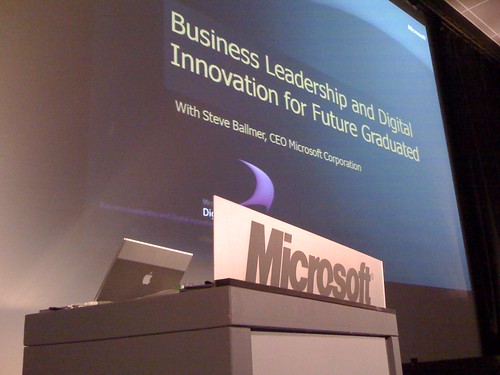
I have to say that this made my day. Just saw this posted on Cult of Mac. Apparently Steve Ballmer was recently giving a presentation at a conference using a MacBook Pro. Did he give up on Vista, too? If you read the comments there, though, apparently several folks used macs for their presentations, doesn't necessarily mean Ballmer used it - but I have to love the picture nonetheless :)
Sunday, April 13, 2008
NMD
It's New Mac Day at the Lowe household. Yay!
We decided to be decadent with our tax refund and upgrade my wife from her 5 year old 1.2Ghz G4 iBook to a shiny new glossy-screened 2.4Ghz Core2Duo MacBook with 2G ram, 160G hard disk, and the SuperDrive. She's tickled.
I was impressed with how easy it was to get it going for her. She's been a faithful user of Time Machine since I bought her an external drive shortly after we upgraded all our machines to Leopard. One of the setup options when powering on the new machine was to transfer information from an existing Mac, with several options as to how to accomplish this task. One of them was from a Time Machine backup - which also happened to be what the lady at the Apple store recommended. So, about 40 minutes after plugging in the backup drive, she was in business. Impressively so. The mac connected right up to our Wi-Fi, all her apps were there and working, all the settings and passwords worked, and all her documents, photos, and other files were ready to go. The only things that she had to do were: authorize the computer on her iTunes account, and reconfigure the printers as those curiously didn't come over.
There are a few things I'm not so impressed about, though. First, the machine did not come with a video adapter, so hooking up her external 19" Samsung monitor and projectors at her work requires that we buy a $20 adapter. The last several macs I've purchased have included this. Also, it didn't come with the Apple remote for use with FrontRow and Keynote. My last Mac purchase included that item as well. Finally, when we bought the iBook for her back in '03, the folks at the Apple store were more than happy to help her copy documents and files from her windows based Dell laptop. This go around, however, they wanted $150 to do the same service, or charge $99 for their ProCare service, which includes one free transfer. That really turned out to be a non-issue for me given how easy it was accomplish.
It's a nice, fast, beautiful machine and we expect good service from it, just as we've had good service from her iBook.
Wednesday, April 2, 2008
Why I run a Mac
I haven't yet posted about work. Currently, I'm Director of Customer Services for a small Software as a Service (SaaS) company. Our services are designed to facilitate fundraising and relationship building for ministries. We support our product on three major platforms: Mac, Linux, and for those unfortunate souls still stuck with it, Windows.
Our company is part of a growing breed of organizations who've realized that walls, bricks, mortar, and especially cubicles, can get in the way of productivity and bringing life and liveliness to their staff. Sometimes this is termed as working in a virtual office, telecommuting, or working from a Small Office/Home Office (SOHO). Whatever you call it, though, I think it's wonderful. Myself or anyone in our company can be productive virtually anywhere there's internet and cell coverage available. That means I can live and be anywhere that brings me life - and still do the work I need to do to contribute to society and tend to my family's material needs and wants.
And with a single Mac computer I can develop, test, demonstrate, and use our products in the environments our clients will.
Why Mac computers? Well, other than the fact that Macs work better for most people than other computers out there, Macs offer one thing that no other computer does. The ability to run Mac OS, Linux, and Windows. Simultaneously. Virtualization products from Parallels and VMWare make this possible. For a company like ours that believes you ought to be able to live and work in ways that suit you, as well as add value to an organization, offering our product in this way only makes sense.
So that in addition to all the other great stuff you've heard about Macs (they just work, they're more secure, they last longer, they're easier to use...) makes it the only computer I'll buy, or recommend.